Step 1: Provide Input File or Data
Select your local file or paste your structured data into the input editor.
Built for software engineers and data analysts: handles sparse keys across objects, nested properties (user.address.city), and quoted multiline strings without breaking columns.
Select your local file or paste your structured data into the input editor.
Select the target format or delimiter option in the workstation toolbar.
Run the in-memory conversion and download your output file immediately.
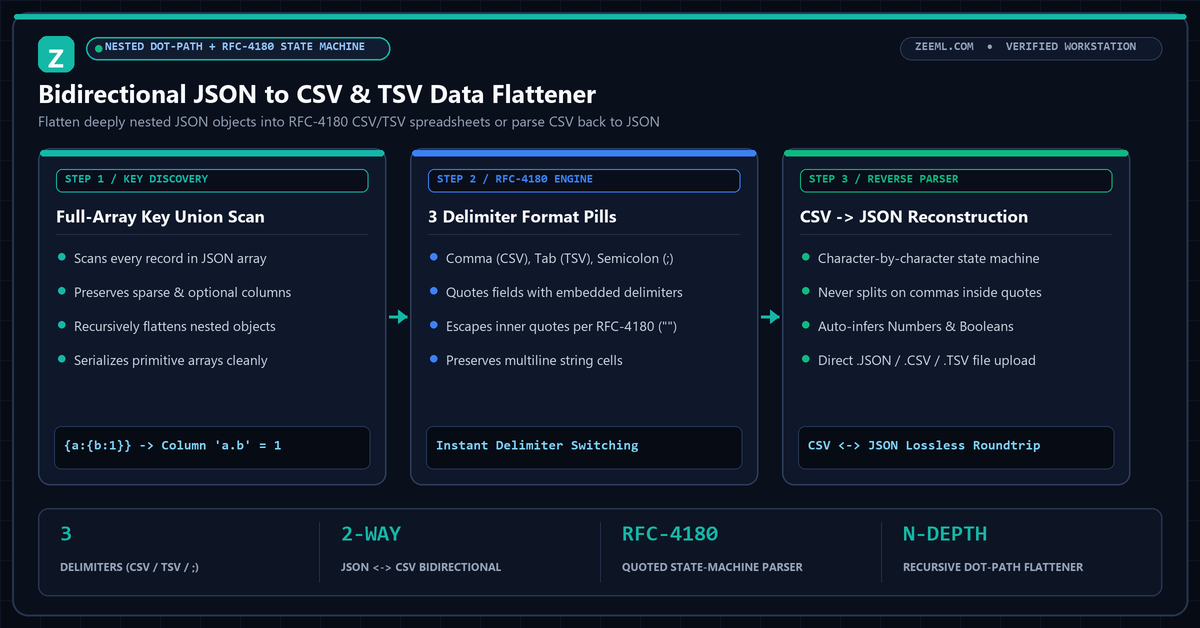
Scans every object in the JSON array (not just row 0) so optional or sparse fields are never dropped from CSV headers.
Recursively flattens nested child objects ({ "metrics": { "latency_ms": 18.4 } }) into clean metrics.latency_ms column headers.
Properly quotes fields containing commas, double quotes (""), or line breaks so Excel and Pandas import cleanly.
Many browser converters use a naive line.split(",") call and inspect only Object.keys(array[0]). That approach corrupts any row containing a comma inside a quoted string and silently drops columns that appear in later records.
ZeeML implements a full RFC-4180 lexical state machine paired with a recursive object flattener. Every key path across the entire dataset is indexed first, ensuring 100% lossless bidirectional conversion between hierarchical JSON and tabular CSV.
Nested objects are flattened using dot notation (e.g., metrics.latency_ms), while primitive arrays are serialized cleanly so column alignment never shifts.
Yes. Click "Parse CSV -> JSON" to run our RFC-4180 state-machine parser, which respects quoted delimiters and escaped double quotes.
Unlike basic converters that only inspect row 0, ZeeML computes the union of all keys across the entire JSON array so sparse columns are never omitted.
Use Tab (TSV) for pasting directly into spreadsheet cells or bioinformatics pipelines, and use Semicolon (;) for European Excel locales where commas are reserved as decimal separators.