Step 1: Provide Input File or Data
Select your local file or paste your structured data into the input editor.


Your confidential contracts, academic manuscripts, and financial PDFs never leave your device—everything is parsed and packaged into OpenXML .docx in local RAM.
100% Client-Side In-Memory Processing — Up to 10 Batch Files (Zero Server Uploads)
Select your local file or paste your structured data into the input editor.
Select the target format or delimiter option in the workstation toolbar.
Run the in-memory conversion and download your output file immediately.
Groups PDF glyph items by vertical baseline coordinates (ΔY <= 6pt) to reconstruct natural paragraphs instead of fragmented text boxes.
Generates standards-compliant word/document.xml and word/styles.xml inside a compressed DOCX container.
Executes PDF parsing inside an isolated browser Web Worker without cross-origin security leaks.
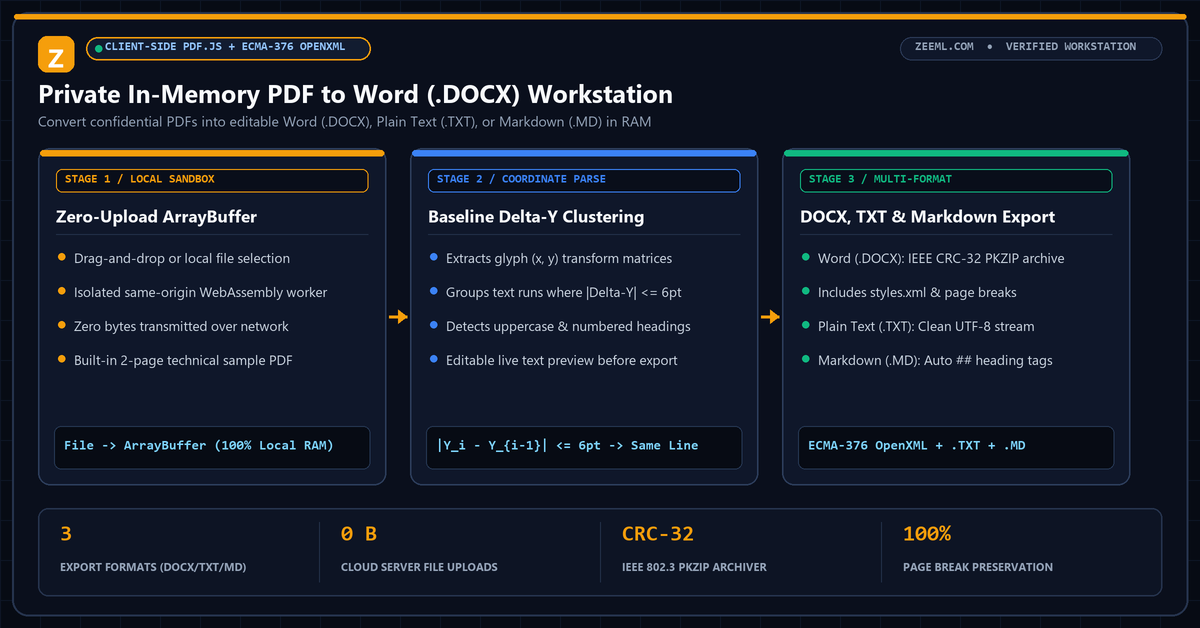
Traditional online PDF converters upload your files to remote cloud queues, creating data-privacy risks for legal, medical, and academic documents.
ZeeML loads the PDF byte buffer directly into a client-side WebAssembly worker, extracts positioned text runs from each page tree, reconstructs paragraph boundaries by vertical coordinate clustering, and compiles a valid OpenXML (.docx) archive in memory.
No. The entire PDF parsing and Word (.docx) packaging pipeline runs locally inside your browser using JavaScript and WebAssembly.
Yes. Each page boundary in the source PDF is mapped to an explicit OpenXML page break (<w:br w:type="page"/>) in the generated Word document.
Yes. Once you select or drop a PDF, the extracted paragraphs appear in the live preview editor where you can make edits before exporting to .DOCX, .TXT, or .MD.
Yes. Select the Plain Text (.TXT) or Markdown (.MD) format pill in the workstation header to export clean UTF-8 text or Markdown with automatic heading promotion.